🌐
Chapter 1.1 — Introduction
🌐 CHAPTER 1.1 — INTRODUCTION MIND MAP
Data Comm → 4 characteristics: Delivery, Accuracy, Timeliness, Jitter | 5 components: Sender-Message-Medium-Protocol-Receiver
Network Types → LAN (building) → MAN (city) → WAN (global, e.g. Internet)
Topologies → Bus, Star (central Hub), Ring, Mesh (n(n-1)/2 links), Tree, Hybrid
Hardware → Repeater/Hub(Physical) → Bridge/Switch(Data Link, MAC) → Router(Network, IP) → Gateway(protocol translate)
Connection Service → Connection-Oriented(TCP, reliable) vs Connectionless(UDP, fast)
OSI (7 layers) → Physical→DataLink→Network→Transport→Session→Presentation→Application (ISO, 1984)
TCP/IP (4 layers) → Network Access→Internet→Transport→Application (practical, real Internet)
1. Introduction to Data Communication & Computer Networks
📖 Data Communication: The exchange of data between two devices via a transmission medium (wire, fiber, wireless).
📖 Computer Network: A collection of interconnected devices (computers, servers, printers) that can communicate and share resources with each other.
4 Fundamental Characteristics of Effective Data Communication:
| Characteristic | Meaning |
|---|
| Delivery | Data must be delivered to the CORRECT destination only |
| Accuracy | Data must be delivered without alteration/errors |
| Timeliness | Data must arrive within a useful time frame (critical for audio/video) |
| Jitter | Variation in packet arrival time must stay minimal |
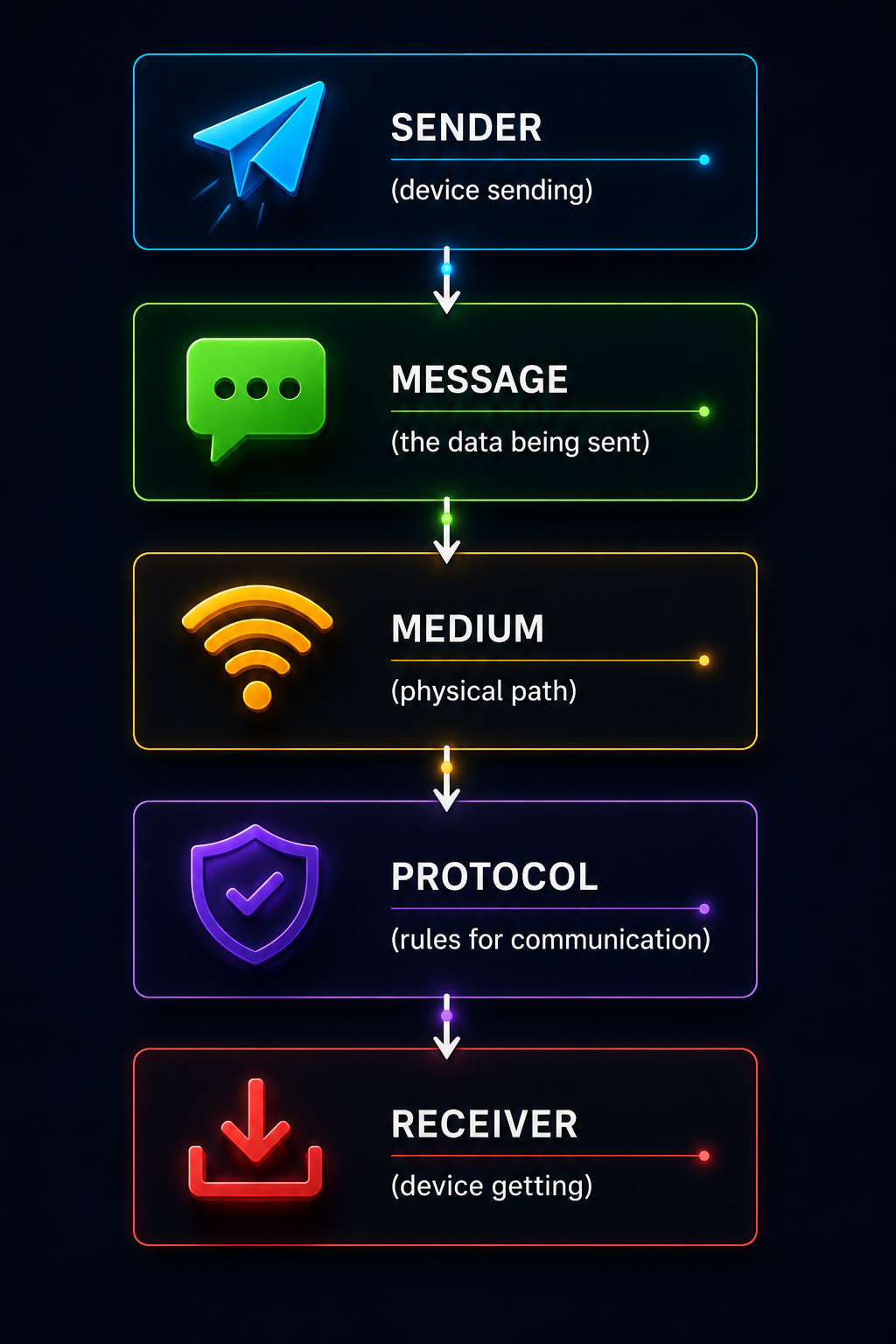
5 Components of a Data Communication System:
📡 5 Components of Data Communication
💡 Exam Tip: "Delivery, Accuracy, Timeliness, Jitter" is a classic 5-mark "characteristics of effective data communication" question — remember all 4 with one example each.
2. Uses of Computer Networks
📖 Why Networks? Networks let multiple devices share resources, communicate, and access information — far more efficient than isolated standalone computers.
| Use Case | Description |
|---|
| Resource Sharing | Sharing printers, files, storage across multiple users |
| Communication | Email, video calls, instant messaging |
| Information Access | Browsing web, accessing remote databases |
| Business Applications | Client-server systems, e-commerce, banking |
| Entertainment | Streaming video/audio, online gaming |
| Distributed Computing | Multiple machines working together on large computations |
💡 Exam Tip: Group answers into 3 broad categories if asked briefly — Business, Home/Personal, and Mobile Users — each with 2-3 examples.
3. Types of Computer Networks — LAN, MAN, WAN
📖 Classification: Networks are classified by GEOGRAPHICAL SIZE/coverage area.
| Type | Full Form | Coverage | Example |
|---|
| LAN | Local Area Network | A single building/campus (up to a few km) | College lab, office network |
| MAN | Metropolitan Area Network | A city (up to ~50 km) | Cable TV network across a city |
| WAN | Wide Area Network | Country/Continent/Global | The Internet itself |
| Feature | LAN | MAN | WAN |
|---|
| Ownership | Single organization | Single/multiple orgs | Multiple organizations |
| Speed | Very High | Moderate | Lower (relatively) |
| Cost of Setup | Low | Moderate | High |
| Error Rate | Low | Moderate | Higher |
💡 Exam Tip: WAN is technically a network of networks (it CONNECTS multiple LANs/MANs together) — the Internet is the best real-world example to cite for WAN.
4. Network Topologies
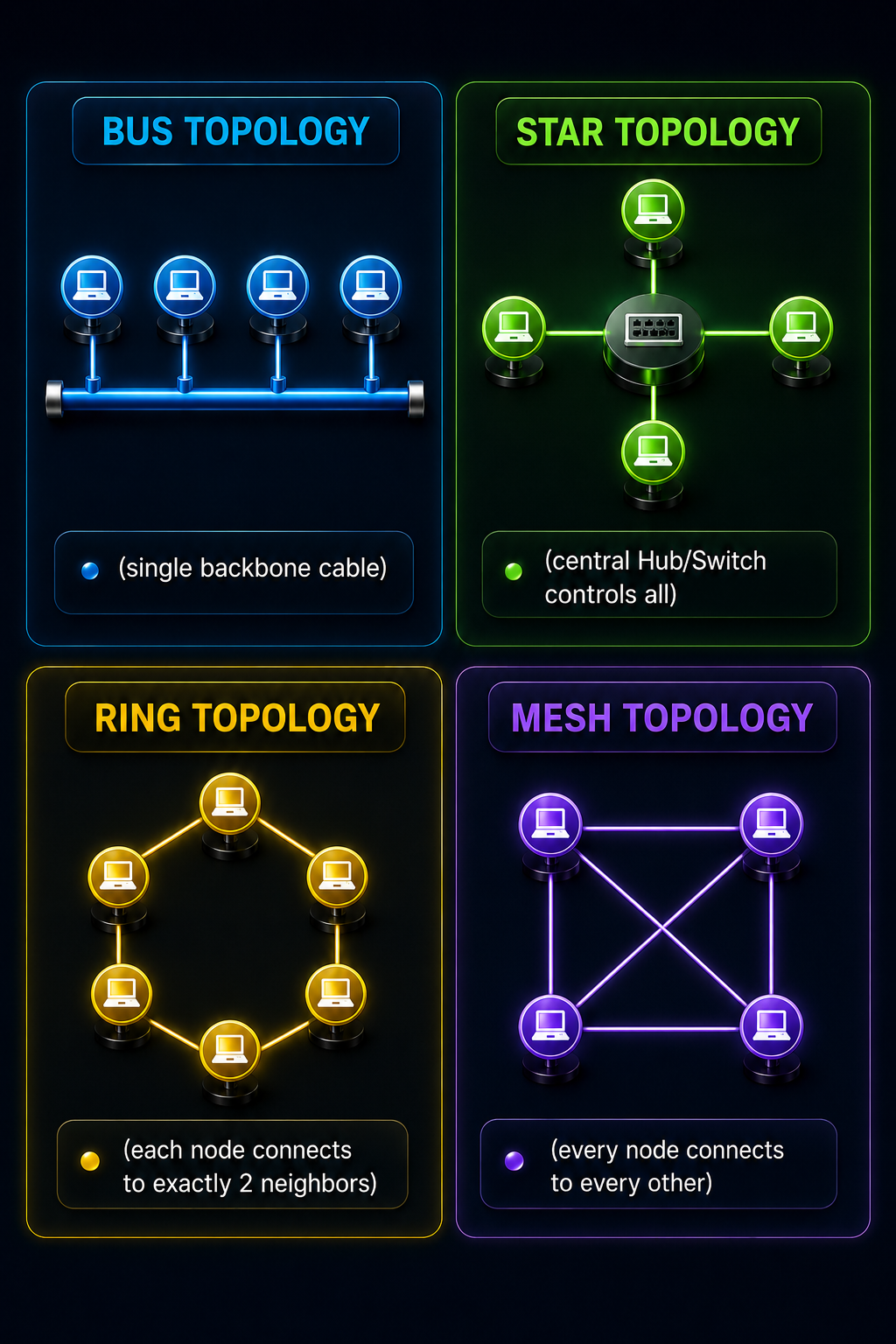
📖 Topology: The physical or logical arrangement/layout of devices (nodes) and connections in a network.
🔗 Common Network Topologies
| Topology | Structure | Advantage | Disadvantage |
|---|
| Bus | All nodes share one backbone cable | Cheap, easy to install | One cable break = whole network down |
| Star | All nodes connect to a central Hub/Switch | Easy to add/remove nodes; one node failing doesn't affect others | If the central hub fails, ENTIRE network goes down |
| Ring | Each node connects to exactly 2 neighbors, forming a loop | Equal access for all nodes, no collisions | One node/link failure can break the entire ring (unless dual ring) |
| Mesh | Every node connects directly to every other node | Highly reliable — no single point of failure | Very expensive; needs n(n−1)/2 links |
| Tree | Hierarchical — star networks connected via a bus backbone | Scalable, easy to expand | Heavy reliance on root/backbone node |
| Hybrid | Combination of two or more topologies | Flexible, combines advantages | Complex design and maintenance |
Number of links needed:
Mesh: n(n−1)/2 | Star: n | Ring: n | Bus: n (drop lines) + 1 (backbone)
💡 Exam Tip: "Which topology requires a central controller?" → Star (the Hub/Switch). This exact question style is common — always connect the topology name to its defining hardware requirement.
5. Network Hardware Components
📖 Networking Hardware: Physical devices required to connect computers and transmit data across a network.
| Device | OSI Layer | Function |
|---|
| Connector | Physical | Physically joins a cable to a device (e.g. RJ-45) |
| Transceiver | Physical | TRANSmits + reCEIVES signals — converts electrical signal to a form suitable for the medium |
| Repeater | Physical | Regenerates/boosts a weak signal so it can travel further |
| Hub | Physical | Connects multiple devices; simply BROADCASTS incoming data to ALL ports (no intelligence) |
| NIC (Network Interface Card) | Data Link | Hardware that lets a device physically connect to and communicate on a network |
| Bridge | Data Link | Connects two LAN segments, filters traffic using MAC addresses |
| Switch | Data Link | Like a smart Hub — sends data ONLY to the intended destination port using MAC addresses |
| Router | Network | Connects different NETWORKS, forwards data using IP addresses, finds best path |
| Gateway | All / Application | Connects networks using DIFFERENT protocols — translates between them |
✅ Hub vs Switch (very common comparison):
Hub → broadcasts to ALL ports, causes collisions, operates at Physical layer.
Switch → sends only to the CORRECT port (using MAC address table), no unnecessary collisions, operates at Data Link layer.
💡 Exam Tip: Devices get "smarter" as you go up the layers: Repeater/Hub (dumb, Physical) → Bridge/Switch (MAC-aware, Data Link) → Router (IP-aware, Network) → Gateway (protocol-translating, any/all layers).
6. Network Software — Design Issues & Protocols
📖 Network Software: Protocols and design principles that govern HOW data is organized, addressed, routed, and delivered — the "rules" layer of networking (as opposed to the physical hardware).
Key Network Design Issues:
| Issue | Concern |
|---|
| Reliability | Ensuring data arrives correctly, even if links/nodes fail |
| Addressing | Uniquely identifying every sender and receiver |
| Routing | Finding the best path from source to destination |
| Flow Control | Preventing a fast sender from overwhelming a slow receiver |
| Error Control | Detecting and correcting/retransmitting corrupted data |
| Fragmentation & Reassembly | Splitting large messages into smaller packets and reassembling at destination |
| Multiplexing/Demultiplexing | Sharing one physical channel among multiple connections |
📖 Protocol: A formal set of RULES that governs how devices communicate — defines format, timing, sequencing, and error handling of messages.
💡 Exam Tip: Design issues are often asked as "List any 4/5 network design issues" — memorize this list of 7 as your go-to answer bank.
7. Connection-Oriented vs Connectionless Service & Service Primitives
📖 Connection-Oriented Service: A connection/session is ESTABLISHED first, data is sent, then the connection is TERMINATED — like a phone call.
📖 Connectionless Service: Each packet ("datagram") is sent independently, with no prior setup — like sending postal letters.
| Feature | Connection-Oriented | Connectionless |
|---|
| Setup Required? | Yes (handshake first) | No |
| Reliability | High — guaranteed delivery, in order | Lower — no guarantee |
| Speed/Overhead | Slower (setup overhead) | Faster (no setup) |
| Example Protocol | TCP | UDP |
| Real-world Analogy | Phone call | Postal letter / Postcard |
Service Primitives:
📖 Service Primitive: A basic operation/command a service provides to the layer above it, used to request specific actions.
| Primitive | Purpose |
|---|
| LISTEN | Server is ready to accept an incoming connection |
| CONNECT | Client attempts to establish a connection |
| RECEIVE | Blocks until a data packet arrives |
| SEND | Sends data over the established connection |
| DISCONNECT | Terminates the connection |
💡 Exam Tip: "Importance of connection-oriented and connectionless phase" questions want you to explain WHEN each is preferred: connection-oriented for reliability-critical apps (file transfer, banking); connectionless for speed-critical apps (video streaming, DNS lookups).
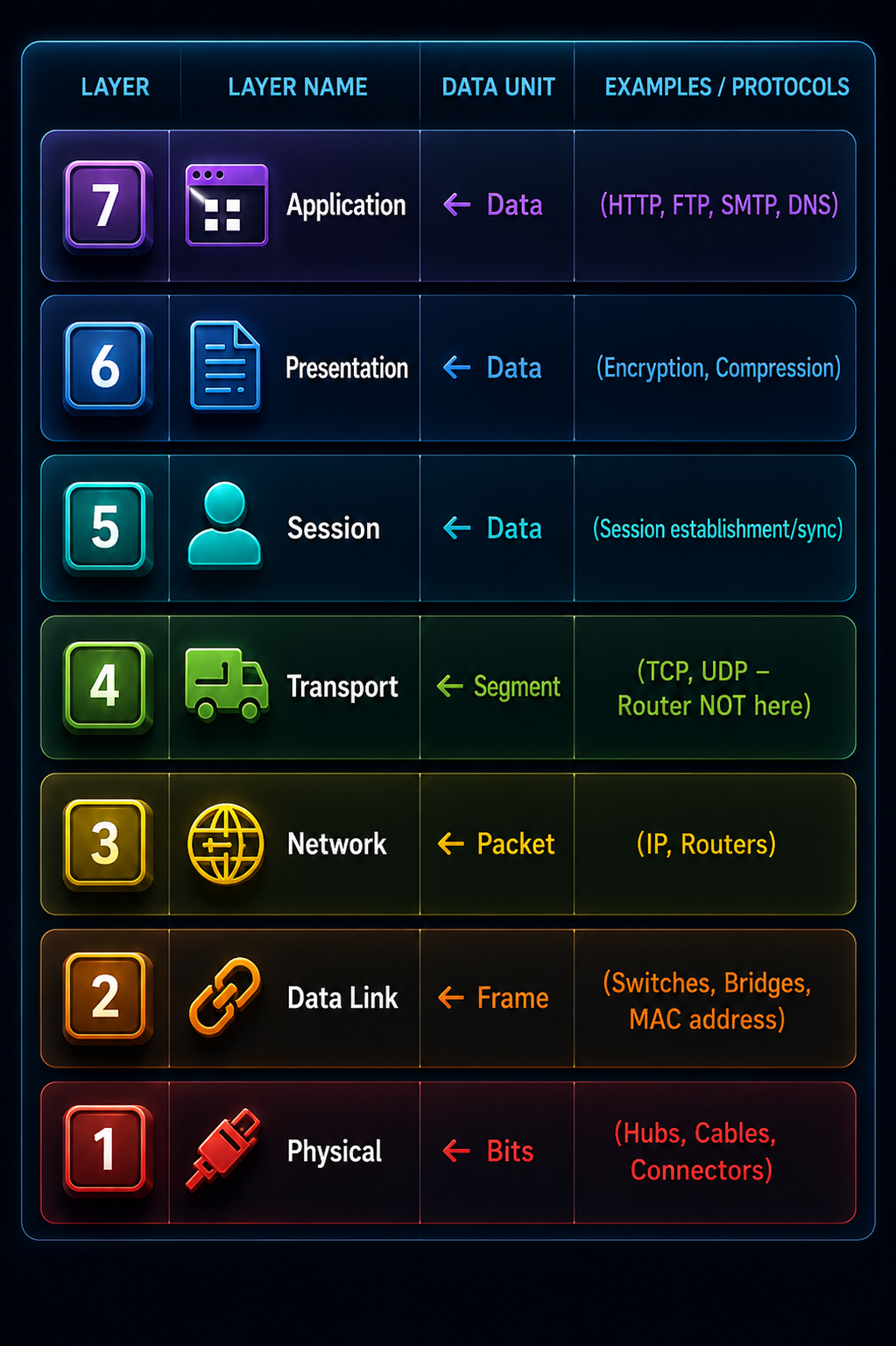
8. OSI Reference Model
📖 OSI Model: "Open Systems Interconnection" — a 7-layer CONCEPTUAL framework proposed by ISO (International Organization for Standardization) in 1984 that standardizes how different systems communicate over a network.
| Layer | Data Unit | Key Job | Devices/Examples |
|---|
| 7. Application | Data | Interface for end-user applications | HTTP, FTP, SMTP, DNS |
| 6. Presentation | Data | Translation, encryption, compression | SSL/TLS, JPEG, ASCII |
| 5. Session | Data | Establishes/manages/ends sessions | NetBIOS, RPC |
| 4. Transport | Segment | End-to-end delivery, error & flow control | TCP, UDP |
| 3. Network | Packet | Logical addressing (IP), routing between networks | IP, Routers |
| 2. Data Link | Frame | Physical/MAC addressing, error detection on a link | Switches, Bridges, Ethernet |
| 1. Physical | Bits | Raw bit transmission over the medium | Hubs, Cables, Connectors |
🔑 Mnemonic (top to bottom): "All People Seem To Need Data Processing" → Application, Presentation, Session, Transport, Network, Data Link, Physical
💡 Exam Tip: "Identify devices at each layer" is a very common question — Physical=Hub/Repeater, Data Link=Switch/Bridge, Network=Router, above that=mostly software/protocols not physical hardware.
9. TCP/IP Model
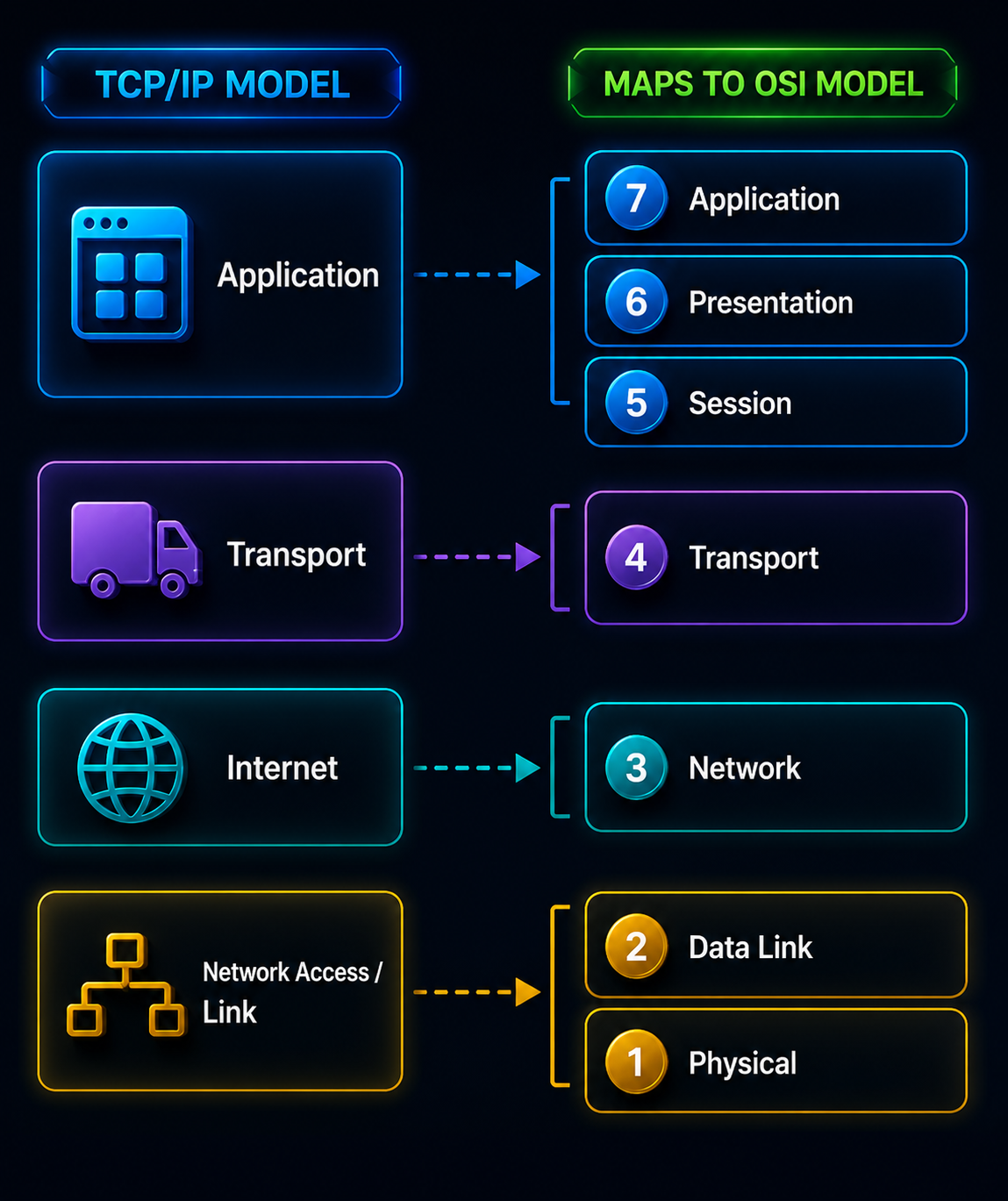
📖 TCP/IP Model: A 4-layer PRACTICAL model that the actual Internet is built on — developed by DoD (US Department of Defense), older and more implementation-focused than OSI's 7-layer theoretical model.
🔄 TCP/IP 4 Layers Mapped to OSI 7 Layers
| Feature | OSI Model | TCP/IP Model |
|---|
| Layers | 7 | 4 (sometimes shown as 5) |
| Nature | Theoretical/Conceptual reference model | Practical, implementation-based (actually used) |
| Developed by | ISO (1984) | DoD/ARPANET (earlier, 1970s) |
| Session/Presentation Layers | Separate layers | Merged into Application layer |
| Protocol Dependency | Protocol-independent (generic) | Protocol-dependent (defines TCP, IP specifically) |
💡 Exam Tip: OSI is the "textbook standard" everyone references; TCP/IP is what the real Internet actually runs on. "Why fewer layers in TCP/IP?" → because Session and Presentation functions got absorbed into the Application layer / built into individual protocols.
📡
Chapter 1.2 — Physical Layer
📡 CHAPTER 1.2 — PHYSICAL LAYER MIND MAP
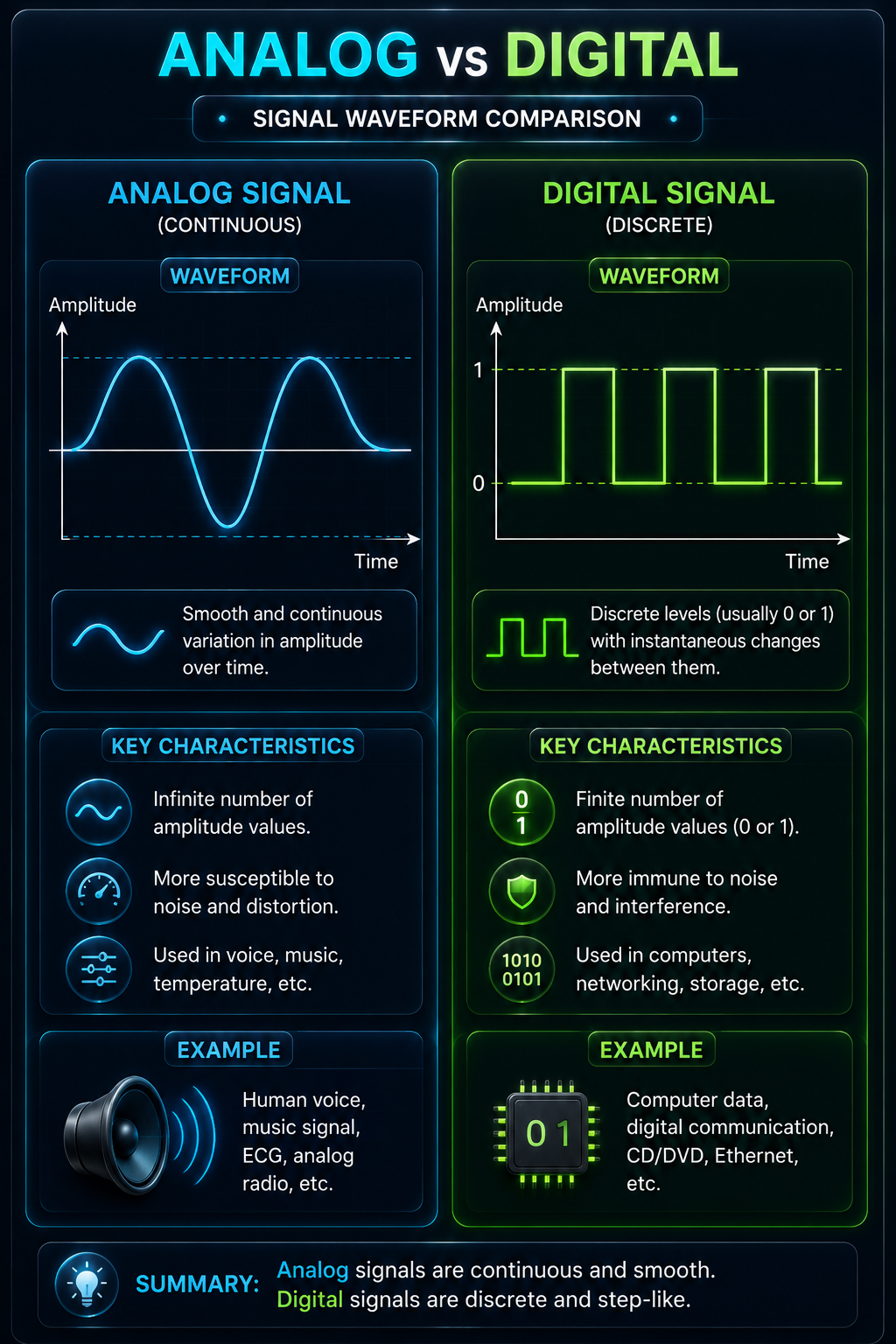
Analog vs Digital → Continuous wave vs discrete 0/1 levels; 4 data-signal combinations possible
Bit Rate vs Baud Rate → Bit Rate = Baud Rate × log₂(L); equal only when L=2
Impairments → Attenuation(weaker signal, dB formula) vs Distortion(shape changes) vs Noise
Nyquist → 2×B×log₂(L) — noiseless channel
Shannon → B×log₂(1+SNR) — noisy channel; actual max = smaller of the two
1. Analog and Digital Data and Signals
📖 Data: Information itself (can be analog or digital).
📖 Signal: The electrical/electromagnetic representation used to TRANSMIT data.
| Type | Data | Signal |
|---|
| Analog | Continuous values (e.g. human voice, temperature) | Continuous wave, infinite possible values |
| Digital | Discrete values (e.g. text, binary data) | Discrete levels — typically just 0 and 1 |
〰️ Analog vs Digital Signal Waveform
| 4 Combinations | Example |
|---|
| Analog data, Analog signal | Telephone call over old analog line |
| Digital data, Digital signal | Computer-to-computer over Ethernet |
| Analog data, Digital signal | Voice digitized for VoIP/mobile calls |
| Digital data, Analog signal | Modem converting computer data for phone lines |
💡 Exam Tip: Data and Signal are independent concepts — data type doesn't force signal type. A modem is the classic example of "digital data sent as an analog signal."
2. Bit Rate, Baud Rate & Bandwidth
📖 Bit Rate: Number of BITS transmitted per second (bps).
📖 Baud Rate: Number of SIGNAL CHANGES (symbols) transmitted per second.
📖 Bandwidth: The range of frequencies a channel can carry — determines maximum data-carrying capacity.
Relationship:
Bit Rate = Baud Rate × log₂(L)
where L = number of signal levels used
💡 Worked Example: If Baud Rate = 1000 and each signal has 4 levels (L=4):
Bit Rate = 1000 × log₂(4) = 1000 × 2 = 2000 bps
💡 Exam Tip: Bit Rate = Baud Rate ONLY when L=2 (binary signaling, only 2 levels: 0 and 1). If more than 2 levels are used per signal, Bit Rate is ALWAYS greater than Baud Rate — a very common "differentiate" question.
3. Transmission Impairments — Attenuation & Distortion
📖 Transmission Impairment: Any effect that degrades a signal as it travels from sender to receiver.
| Impairment | What Happens | Fix |
|---|
| Attenuation | Signal LOSES strength/energy as it travels longer distances | Amplifiers/Repeaters boost the signal |
| Distortion | Signal changes FORM/SHAPE — different frequency components travel at different speeds | Equalizers correct the shape |
| Noise | Unwanted random signals get added to the original signal | Filtering, shielding cables |
Attenuation (measured in decibels, dB):
dB = 10 log₁₀(P₂/P₁)
where P₁ = input power, P₂ = output power
(negative dB = signal loss/attenuation, positive dB = amplification)
💡 Worked Example: A signal has power 100W at the start and 5W after transmission.
dB = 10 log₁₀(5/100) = 10 log₁₀(0.05) = 10 × (−1.3) = −13 dB (signal attenuated/lost strength)
💡 Exam Tip: Attenuation = signal gets WEAKER (amplitude drops); Distortion = signal changes SHAPE (waveform gets deformed). Don't confuse the two — they're different problems with different fixes.
4. Channel Capacity — Nyquist Formula & Shannon Formula
📖 Channel Capacity: The MAXIMUM data rate (bits per second) a channel can theoretically support.
A. Nyquist Formula — for NOISELESS channels:
Nyquist Bit Rate = 2 × B × log₂(L)
B = Bandwidth (Hz), L = number of signal levels
💡 Worked Example (exact PYQ style):
"Consider a noiseless channel with a bandwidth of 3000 Hz transmitting a signal with two signal levels. Calculate its Nyquist bit rate."
B = 3000 Hz, L = 2
Bit Rate = 2 × 3000 × log₂(2) = 2 × 3000 × 1 = 6000 bps
B. Shannon Formula — for NOISY channels:
Shannon Capacity = B × log₂(1 + SNR)
B = Bandwidth (Hz), SNR = Signal-to-Noise Ratio (as a plain ratio, not dB)
💡 Worked Example:
A channel has bandwidth 3000 Hz and SNR = 3162 (≈35 dB).
Capacity = 3000 × log₂(1 + 3162) = 3000 × log₂(3163) ≈ 3000 × 11.6 ≈ 34,860 bps
| Feature | Nyquist | Shannon |
|---|
| Applies to | Noiseless channel | Noisy channel |
| Depends on | Bandwidth + Signal Levels (L) | Bandwidth + SNR |
| Real-world use | Theoretical upper limit (ideal case) | More realistic (all real channels have noise) |
💡 Exam Tip: If BOTH limits are calculable for the same channel, the ACTUAL maximum data rate is the SMALLER of the two values — Shannon's is usually the binding constraint in real (noisy) channels since noise always exists in practice.
📶
Chapter 1.3 — Transmission Media
📶 CHAPTER 1.3 — TRANSMISSION MEDIA MIND MAP
Guided → Twisted Pair(UTP/STP) → Coaxial → Fiber Optic(fastest, light-based, immune to EMI)
Unguided → Radio(omnidirectional, penetrates walls) → Microwave(line-of-sight) → Infrared(short-range, blocked by walls)
Wireless Networks → Bluetooth(PAN, ~10m) → WiFi(LAN, ~30-50m) → 5G(cellular, km range)
5G Categories → eMBB(speed), URLLC(low-latency), mMTC(massive IoT)
1. Guided Transmission Media
📖 Guided Media: Transmission media where signals travel through a PHYSICAL, solid conductor/cable — also called "wired" or "bounded" media.
| Medium | Structure | Speed | Use Case |
|---|
| Twisted Pair | Two insulated copper wires twisted together (reduces interference) | Low-Moderate (up to 1 Gbps) | Telephone lines, LANs (Ethernet) |
| Coaxial Cable | Central copper conductor + insulation + metallic shield + outer jacket | Moderate-High (up to 10 Gbps) | Cable TV, older Ethernet |
| Fiber Optic | Glass/plastic core carrying LIGHT pulses | Very High (Tbps range) | Backbone networks, long-distance, internet |
Twisted Pair — 2 Types:
UTP (Unshielded Twisted Pair): No extra shielding, cheaper, more susceptible to interference. Used in most LANs.
STP (Shielded Twisted Pair): Has metallic shielding, reduces interference, more expensive.
✅ Why Fiber Optic is Best: Immune to electromagnetic interference (uses light, not electricity), extremely high bandwidth, very low signal loss over distance, most secure (hard to tap).
❌ Fiber Optic Drawback: Expensive to install, fragile (can't bend sharply), requires specialized equipment to splice/repair.
💡 Exam Tip: Twisted pair uses "twisting" specifically to cancel out electromagnetic interference from nearby wires (each wire picks up equal but opposite noise, which cancels out) — this is a classic "why is it twisted" reasoning question.
2. Unguided Transmission (Wireless) Media
📖 Unguided Media: Transmission through free space/air without any physical conductor — signals radiate in all/some directions as electromagnetic waves.
| Type | Frequency Range | Directionality | Use Case |
|---|
| Radio Waves | 3 kHz – 1 GHz | Omnidirectional (all directions) | AM/FM radio, Wi-Fi (partly) |
| Microwaves | 1 GHz – 300 GHz | Unidirectional (needs line-of-sight) | Satellite communication, mobile networks |
| Infrared | 300 GHz – 400 THz | Very directional, short-range | TV remotes, short-range device links |
Key Distinguishing Property:
Radio Waves → can penetrate walls, travel long distances, omnidirectional
Microwaves → need clear LINE OF SIGHT (blocked by obstacles like hills/buildings)
Infrared → CANNOT penetrate walls at all — that's why TV remotes don't work through walls!
💡 Exam Tip: "Why doesn't your TV remote work from another room?" → Infrared cannot penetrate solid obstacles like walls — a favorite real-world reasoning question testing whether you understand infrared's limitations.
3. Wireless Networks — WiFi, Bluetooth & 5G Basics
📖 Wireless Network: A network where devices connect and communicate without physical cables, using radio-frequency signals.
| Technology | Standard | Range | Typical Speed | Use Case |
|---|
| WiFi | IEEE 802.11 | ~30-50m indoors | Up to several Gbps (WiFi 6) | Home/office LANs, internet access |
| Bluetooth | IEEE 802.15 | ~10m (short range) | Up to ~2-3 Mbps | Wireless earphones, peripherals, PAN |
| 5G | 3GPP cellular standard | Several km (cell towers) | Up to 10+ Gbps | Mobile broadband, IoT, low-latency apps |
5G — 3 Key Use-Case Categories:
eMBB (Enhanced Mobile Broadband) → very high data speeds for streaming/browsing
URLLC (Ultra-Reliable Low-Latency Communication) → near-instant response, critical for self-driving cars, remote surgery
mMTC (Massive Machine-Type Communication) → connecting huge numbers of IoT devices simultaneously
💡 Exam Tip: Bluetooth operates in a "Personal Area Network" (PAN) — the smallest network range category, even smaller than LAN. This range hierarchy (PAN < LAN < MAN < WAN) is a good thing to connect back to Topic 1.1's network types.
⚡
Ready for Exam?
Sab padh liya? Ab Quick Revision karo — key points aur formulas ek jagah!
Quick Revision Karo →
⚡
Quick Revision — Last Minute Exam Prep!
📌 How to Use: Read this 5-10 minutes before exam. Contains all important points in condensed form. Focus on tables, comparisons, and key formulas!
🌐 Chapter 1.1 — Introduction
📖 4 Characteristics of Effective Data Comm:
Delivery (correct destination) | Accuracy (no errors) | Timeliness (arrives in time) | Jitter (minimal delay variation)
🔑 Network Types by Range:
PAN (Bluetooth, ~10m) → LAN (building) → MAN (city) → WAN (global — Internet)
TOPOLOGIES QUICK RECALL:
Bus → single backbone cable
Star → central Hub/Switch (needs central controller)
Ring → each node has exactly 2 neighbors
Mesh → n(n−1)/2 links, most reliable, most expensive
Trick: "which topology needs central controller" → Star (Hub)
✅ Hardware by Layer:
Physical → Repeater, Hub
Data Link → Bridge, Switch (MAC address)
Network → Router (IP address)
Any/All → Gateway (protocol translation)
💡 Connection-Oriented vs Connectionless:
TCP (reliable, setup first, like phone call) vs UDP (fast, no setup, like postal letter)
| Topic | Key Fact | Trick |
|---|
| OSI Model | 7 layers, ISO 1984 | Mnemonic: All People Seem To Need Data Processing |
| OSI Devices | Physical=Hub, DataLink=Switch, Network=Router | Devices get "smarter" going up |
| TCP/IP Model | 4 layers, practical/real Internet | Session+Presentation merged into Application |
| Network Design Issues | Reliability, Addressing, Routing, Flow/Error Control | 7 issues to list |
📡 Chapter 1.2 — Physical Layer
📖 Analog vs Digital:
Analog = continuous wave/values | Digital = discrete levels (mostly 0/1)
4 combinations possible — data type ≠ signal type (e.g. modem = digital data on analog signal)
BIT RATE vs BAUD RATE:
Bit Rate = Baud Rate × log₂(L)
Equal ONLY when L=2 (binary)
Quick Recall: Baud=1000, L=4 → Bit Rate = 1000×log₂(4) = 2000 bps
⚠️ Attenuation vs Distortion:
Attenuation = signal gets WEAKER (dB = 10log₁₀(P₂/P₁))
Distortion = signal changes SHAPE
Fix: Amplifiers (attenuation) vs Equalizers (distortion)
💡 Nyquist & Shannon — Quick Recall:
Nyquist (noiseless): Rate = 2 × B × log₂(L)
→ B=3000Hz, L=2 → Rate = 2×3000×1 = 6000 bps
Shannon (noisy): Capacity = B × log₂(1+SNR)
→ Actual max = SMALLER of the two values
| Topic | Formula | Trick |
|---|
| Bit Rate | Baud Rate × log₂(L) | Equal only if L=2 |
| Attenuation (dB) | 10log₁₀(P₂/P₁) | Negative dB = signal loss |
| Nyquist | 2 × B × log₂(L) | For NOISELESS channel |
| Shannon | B × log₂(1+SNR) | For NOISY channel |
📶 Chapter 1.3 — Transmission Media
📖 Guided Media (wired):
Twisted Pair (UTP/STP) → Coaxial → Fiber Optic (fastest, light-based, immune to EMI, but expensive/fragile)
🔑 Unguided Media (wireless):
Radio Waves → omnidirectional, penetrates walls
Microwave → needs line-of-sight, blocked by obstacles
Infrared → very short-range, CANNOT penetrate walls (why TV remotes don't work through walls)
✅ Wireless Networks by Range:
Bluetooth (PAN, ~10m) → WiFi (LAN, ~30-50m) → 5G (cellular, km range)
5G categories: eMBB (speed), URLLC (low-latency), mMTC (massive IoT)
| Topic | Key Fact | Trick |
|---|
| Twisted Pair | Twisting cancels EMI | UTP=cheap, STP=shielded |
| Fiber Optic | Light-based, Tbps range | Immune to EMI, but fragile |
| Radio vs Microwave vs Infrared | Omnidirectional → Line-of-sight → Short-range | Infrared blocked by walls |
| Bluetooth vs WiFi vs 5G | PAN → LAN → Cellular | Range increases in that order |
⚠️ Common Exam Mistakes
❌ Confusing Bit Rate with Baud Rate — they're only equal when signal levels L=2
❌ Using Shannon's formula for a NOISELESS channel (that's Nyquist's job) or vice versa
❌ Mixing up Attenuation (weaker signal) with Distortion (changed shape)
❌ Forgetting Star topology needs a CENTRAL controller (Hub/Switch) — single point of failure
❌ Placing Router at Data Link layer instead of Network layer (Router = Network layer, IP-based)
❌ Forgetting OSI has 7 layers but TCP/IP has only 4 (Session+Presentation merge into Application)
❌ Saying Infrared can pass through walls — it CANNOT (that's why remotes don't work through walls)
✅ Pre-Exam Checklist
☑ 4 characteristics of effective data communication
☑ LAN vs MAN vs WAN with examples
☑ All 6 network topologies + advantages/disadvantages
☑ Network hardware devices mapped to OSI layers
☑ Network design issues (list of 7)
☑ Connection-Oriented vs Connectionless + Service Primitives
☑ OSI Model — all 7 layers, mnemonic, devices at each layer
☑ TCP/IP Model — 4 layers + comparison with OSI
☑ Analog vs Digital data/signal combinations
☑ Bit Rate vs Baud Rate formula + numerical practice
☑ Attenuation (dB formula) vs Distortion
☑ Nyquist formula — noiseless channel numericals
☑ Shannon formula — noisy channel numericals
☑ Guided media — Twisted Pair, Coaxial, Fiber Optic comparison
☑ Unguided media — Radio, Microwave, Infrared differences
☑ Wireless networks — Bluetooth, WiFi, 5G ranges and use cases
🎯 Exam Strategy
2 Mark Questions:
• Direct definition + 1 example. Time: 3-4 minutes.
• "Recall/Define/List" style → keep it short and precise, no need for lengthy explanation.
5 Mark Questions:
• Definition + Diagram + Formula/Numerical. Time: 7-8 minutes.
• Nyquist/Shannon numericals — show the formula, substitute values, show every calculation step.
• Topology/OSI questions — draw the diagram first, then explain.
Marks-saving tip:
Even if a numerical isn't fully solved, writing the correct formula and identifying given values (B, L, SNR) earns partial marks!
🌟 All the Best!
Computer Networks Unit 1 mixes concepts (OSI/TCP-IP, topologies) with numericals (Nyquist/Shannon) — practice both. Diagrams draw karo by hand, formulas yaad karo, aur tu ready hai! 💪🌐
📄
Previous Year Questions
Previous Year Question Paper Not Available Yet
Previous year question papers for this unit are not available yet. If you have the question paper, please share it through the contact page so it can be added for other students.